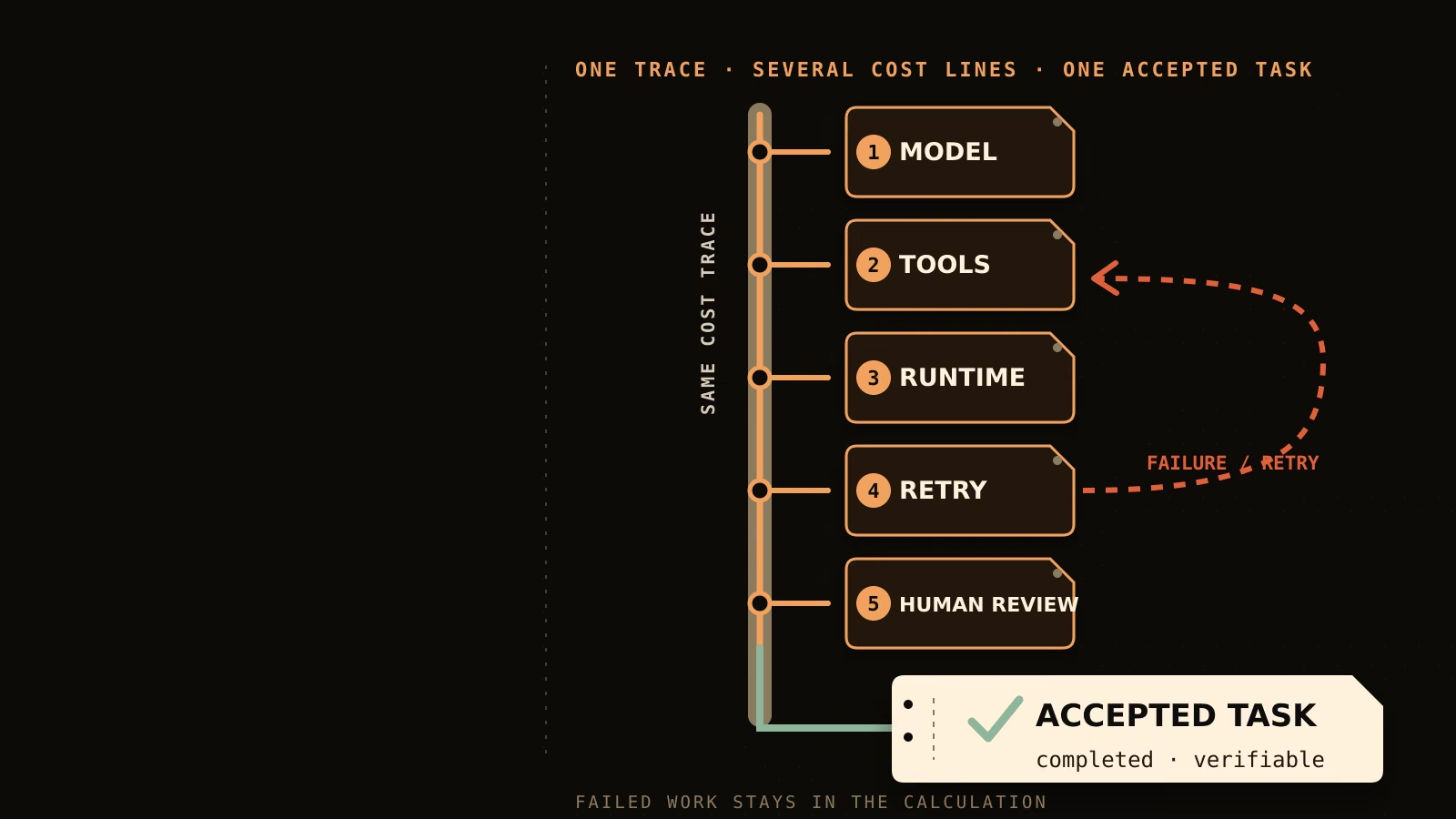
There is no universal price for an AI agent. A budget you can defend starts with one bounded workflow and three separate layers: setup, measured cost per completed task, and ongoing operation and control. A market range tells you very little unless it also states the volume, number of steps, tools, failure behaviour and human-review time behind it.
Start with the business outcome, not the token price. Run a small, representative batch of real-shaped cases. Attribute each meter to the workflow, keep failed attempts and rework in the calculation, and reconcile your estimate with billed usage before projecting a monthly cost.
An AI agent does not have one cost meter
An agent may read an inbound request, retrieve a document, call a business system, check the outcome and wait for approval. Each part of that path can create a different cost line.
OpenAI and Anthropic both publish pricing with separate treatment for model input, output, cache and some tools or features. Tool use can also add model tokens rather than replacing them.[1][2] A spreadsheet with one line called “tokens” will miss costs that are visible in the supplier’s own usage data.
The shape of the bill also changes with the architecture. Google prices models, grounding and other platform capabilities separately.[3] Microsoft lists models, hosted agents, tools and knowledge as distinct parts of Foundry Agent Service.[4] AWS describes AgentCore as modular: runtime, memory, browser, observability and other capabilities may have their own meters or underlying resource charges.[5] These pages show why one blended agent price is weak evidence. They do not establish which provider is better or cheaper overall.
Keep three ledgers even if the proposal presents one total:
- Setup: workflow scoping, integrations, rules, acceptance work and the path into operations.
- Variable usage: model, cache, tools, retrieval, storage, compute, retries and human review for the measured batch.
- Ongoing operations: monitoring, maintenance, licences, environments, incident handling and recurring human control.
That separation gives buyers a way to see what will change with volume and what will not.
Define the completed task before measuring cost
A useful denominator is an accepted business task, not an API request or an agent run. In an inbox workflow, that might be one request assigned to the right queue with the required fields. In document handling, it could be one extraction checked against its source. In a CRM workflow, it might be a proposed record update accepted under the agreed rule.
Write the completion condition first. A technically finished run is not an accepted task if a required field is missing, the output cannot be used, or a person has to rebuild it from scratch.
Use this formula:
Cost per completed task = (metered batch costs + allocated human review and rework) / accepted completed tasks
Failed, retried and escalated runs stay in the numerator. They consumed model calls, tools, runtime or staff time even though they produced no accepted item. Removing them rewards the workflow on paper for failing. AWS’s Agentic AI Lens makes the same attribution move: cost visibility should reach beyond the cloud account to the reasoning cycle, agent, workflow and completed task.[8]
This is a cost calculation, not an ROI claim. Whether the accepted task creates enough value is a separate decision with a different evidence set.

Instrument a representative batch
A polished demo is not a cost baseline. Build a test batch that resembles expected work and includes more than the happy path. There is no fixed batch size that suits every workflow. Coverage matters: normal cases, long or ambiguous input, missing documents, unavailable tools, retries and human escalation.
Attach a workflow identifier to each task and retain only the cost fields you need:
- final state: accepted, rejected, failed or reworked;
- model input, output and cache where the bill distinguishes them;
- tool and service calls, including search, extraction, storage and business-system access;
- metered runtime or compute;
- retries, stopped loops and escalations;
- human review and correction time;
- environment, provider, region and processing tier when they change a meter.
This is deliberately narrower than a general AI agent observability programme. Every field here exists to attribute spend. Anthropic’s Cost Report API shows the kind of detail that may be available: time buckets plus dimensions such as workspace, model, cost type, service tier and token type.[7]
Microsoft recommends estimating first, generating representative test traffic, reviewing actual meter charges and adjusting the baseline before rollout. Its guidance also warns that Foundry costs cover only part of the wider application cost.[9]
There are two joins to verify. First, connect the execution trace to the usage meter. Then connect the usage meter to the bill. If a charge cannot be tied to a workflow, label it unallocated. Do not spread it across successful tasks merely to make the columns balance.
Build a three-layer cost sheet
The cost sheet does not need invented example figures. Leave each value blank until a quote, contract, usage report or test run supplies it. Every row needs an owner and an evidence source.
| Layer | Cost input | Unit or method | Owner | Evidence |
|---|---|---|---|---|
| Setup | Scope and acceptance definition | Delivery time or quoted amount | Business + delivery | Agreed scope |
| Setup | Integrations, rules and testing | Delivery time or quoted amount | Delivery | Quote + work log |
| Variable | Model input, output and cache | Provider meters | Engineering | Usage report + bill |
| Variable | Tools, search, retrieval and storage | Calls, sessions or resources | Engineering | Service report |
| Variable | Runtime and compute | Metered duration or resources | Engineering | Infrastructure meters |
| Variable | Failures, retries and escalations | Spend tied to the same workflow | Operations | Trace + usage report |
| Variable | Human review and rework | Time allocated to the batch | Business | Review log |
| Ongoing | Monitoring, maintenance and licences | Contract period | Operations + procurement | Contract + bill |
| Ongoing | Environments and manual continuity | Resources and staff time | Engineering + business | Inventory + procedure |
Record currency, region, processing tier and verification date wherever they affect pricing. A list-price page is not the final bill. Contract terms, commitments, taxes, currency conversion and third-party services may change what is charged.
This sheet also exposes scope gaps early. If nobody owns a row, the cost will either disappear from the estimate or arrive later as an operational surprise.
Model volume from observed variance
A single mean hides the expensive work. Keep the distribution from the test batch and build low, central and high scenarios from the observed case mix. These are workload scenarios, not market price bands.
For each scenario, state:
- expected task volume;
- the share accepted on the first run;
- the observed mix of retries, failures and escalations;
- the model and tool mix;
- allocated human time;
- fixed and recurring cost lines;
- the date of every price sheet used.
The high scenario should correspond to something you actually saw, such as more long documents, searches, retries or reviews. It should not be an arbitrary contingency percentage. If the test missed a case family, write down the uncertainty rather than assigning it a plausible-looking cost.
Keep estimated and billed actuals in separate columns. Variance may come from price changes, attribution gaps, workload drift or a cost line omitted from the model. Review the cause before updating the baseline. Otherwise the estimate becomes a moving number with no audit trail.
Do not extrapolate a successful-task unit cost by simply multiplying it by all inbound work. The monthly model needs the accepted-task rate and the cost of the work that fails before acceptance.
Use alerts, caps and a degraded path together
Spend controls do different jobs. An alert sends a notification while traffic continues. A hard spend limit rejects affected requests when tracked spend reaches the configured cap. Enforcement is not instantaneous, so recorded spend can slightly exceed the configured amount.[6]
A hard limit protects a budget, but it can interrupt a live workflow. Decide what happens to an in-flight task before enabling the cap:
- apply iteration, duration or consumption limits at workflow level;
- mark an interrupted task incomplete rather than returning a false success;
- place the case in a manual queue with its current state;
- name the person who receives the alert and decides what resumes;
- retain costs already incurred against the stopped task.
A degraded path can be modest. The agent may switch from acting to drafting, or hand the case to a person without discarding the work already done. Incident containment and recovery deserve their own runbook; the cost sheet only needs to show the resource and staff implications of that path.
Questions to settle before comparing proposals
Two proposals are comparable only when they price the same unit of work and expose exclusions. Ask the delivery team:
- What accepted completed task is the denominator?
- Which models, tools, connections, licences, stores and environments are included?
- Which services will a third party bill directly?
- Which volume, input-length and case-mix assumptions support the estimate?
- How are retries, failures, escalations and human reviews charged?
- Which lines are setup, variable usage or ongoing operations?
- How will a provider price or tier change update the estimate?
- Can usage be exported and reconciled to the bill by workflow?
- What happens when an alert or hard limit is reached?
- Who owns the baseline and approves estimate-versus-actual variance?
A pre-production AI agent evaluation tells you whether the output is acceptable. The cost sheet tells you what the accepted and failed work consumed. Keep both, but do not turn one into a proxy for the other.
Bring one workflow, its volume and a small set of real cases. Last Word can turn them into a testable budget before building the agent. Explore our AI and automation services, or describe the workflow you want to scope.
Frequently asked questions
How much does an AI agent cost?
There is no universal amount. Cost depends on the workflow, volume, model and tool mix, failure behaviour, human review and ongoing operations. Measure a representative batch, calculate cost per accepted completed task, then add setup and recurring lines.
How do you calculate AI-agent cost per task?
Add the batch’s metered costs and allocated human review or rework, then divide by accepted completed tasks. Failed, retried and escalated runs remain in the numerator because they still consumed resources.
Are model tokens the whole cost of an AI agent?
No. Depending on the architecture, the bill may also include cache, tools, search, retrieval, storage, runtime, compute, connections, licences and human control.[1][2][3][4][5] Use the meters from the architecture you actually test.
Which costs sit outside the initial build quote?
Look for excluded third-party services, environments, monitoring, maintenance, licences, retries and human review. Ask who bills each line and how it will be reconciled with measured usage.
How do you cap AI-agent spend without breaking the workflow?
Set workflow-level limits, monitor the usage meters and combine alerts with a hard cap and a degraded path. An alert does not stop traffic. A hard limit may interrupt the service, and enforcement can lag slightly.[6]
How should buyers compare two AI-agent proposals?
Normalize both proposals to the same accepted completed task, expected volume and cost scope. Compare inclusions, workload assumptions, treatment of failures, human time, recurring operations and access to usage reports. A headline range without those details is not comparable.
Sources
[1] https://developers.openai.com/api/docs/pricing — OpenAI, “Pricing”, model, cache, tool and container meters, no update date displayed, accessed 9 September 2026.
[2] https://docs.anthropic.com/en/docs/about-claude/pricing — Anthropic, “Pricing”, model, cache and feature meters, no update date displayed, accessed 9 September 2026.
[3] https://cloud.google.com/vertex-ai/pricing — Google Cloud, “Vertex AI pricing”, platform model, service and resource pricing, no update date displayed, accessed 9 September 2026.
[4] https://azure.microsoft.com/en-us/pricing/details/foundry-agent-service — Microsoft Azure, “Foundry Agent Service pricing”, models, hosted agents, tools and knowledge, no update date displayed, accessed 9 September 2026.
[5] https://aws.amazon.com/bedrock/agentcore/pricing — AWS, “Amazon Bedrock AgentCore Pricing”, modular capabilities and consumed resources, no update date displayed, accessed 9 September 2026.
[6] https://developers.openai.com/api/docs/guides/spend-limits — OpenAI, “Spend limits”, alert versus hard-limit behaviour and enforcement lag, no update date displayed, accessed 9 September 2026.
[7] https://platform.claude.com/docs/en/api/admin/cost_report/retrieve — Anthropic, “Get Cost Report”, time buckets and cost-attribution dimensions, no update date displayed, accessed 9 September 2026.
[8] https://docs.aws.amazon.com/wellarchitected/latest/agentic-ai-lens/agentcost05.html — AWS Well-Architected, “Agent cost visibility and attribution”, workflow and completed-task attribution, no update date displayed, accessed 9 September 2026.
[9] https://learn.microsoft.com/en-us/azure/foundry/concepts/manage-costs — Microsoft Learn, “Plan and manage costs for Microsoft Foundry”, estimates, test traffic and meter reconciliation, no update date displayed, accessed 9 September 2026.