An AI agent will not fix messy documentation. It will make that mess easier to search and faster to repeat, sometimes with enough confidence to hide the contradictions.
Before connecting an AI support agent to a FAQ, internal procedures, a CRM or past tickets, decide what it may read, when it may read it, which permissions apply and when it must stop. Model choice comes later.
A knowledge base is not a bigger archive. It is a controlled working set that the agent can search, cite and follow, then leave alone when the risk rises.
Scoping verdict If a source has no owner, no date, unclear permissions or no precise use case, it is not ready for an AI agent. The team may still need it, but it should be cleaned, restricted or left out of the pilot.
Start with the decision, not the documents
An AI knowledge base should support a real answer or decision. Without that anchor, it quickly becomes a large indexed folder where the model hunts for enough material to produce a plausible sentence.
Write the use case first:
When [a recurring request] arrives, the agent reads [authorised sources], prepares [an answer or action], then stops if [risk condition].A few ordinary examples: answer a simple billing question, retrieve an internal procedure, draft a support reply for approval, classify an inbound request, or prepare a case summary before a person steps in.
That sentence forces the team to name the boundary. It also prevents the common mistake of giving the agent “all our documentation” when the job only needs a handful of dependable sources. In its guidance on deploying generative AI, the CNIL recommends starting with a concrete need and defining permitted and prohibited uses.1
If the need is still vague, begin with an AI support agent brief. The knowledge base should serve the scope, not define it by accident.
List the sources without granting access to everything
Potential sources include support FAQs, internal procedures, product sheets, refund policies, email templates, read-only customer records, help pages, ticket histories stripped of unnecessary data, business rules, standard contracts and technical documentation.
But “available to the team” does not mean “safe for the agent to read”. A document may help a manager while being unsuitable for an automated reply. Old tickets can reveal useful language, yet they may also contain personal data or one-off exceptions that must never become the new rule.
Keep a short record for each source:
Use
Which recurring request does this source help resolve? If the answer is vague, leave it out of the first scope.
Owner
Who fixes the document when the agent or the team finds an error? Without an owner, the knowledge base decays quietly.
Version
Is the source current, superseded or inconsistent with another rule? A well-written old procedure is still the wrong source.
Permission
May the agent read this source for this channel, team and request type? Access should stay as narrow as the job allows.
Risk
What happens if the agent uses it badly: minor inconvenience, customer error, exposed data, commercial commitment or an irreversible decision?
Stop rule
When should the agent refuse, ask for clarification or hand the case to a person?
This record turns a pile of documents into material a pilot can use. It also exposes the sources that nobody knows how to maintain or authorise.
Resolve contradictions before indexing
An agent can retrieve information faster than a person. It cannot reliably arbitrate between two conflicting rules unless the business has said which one wins.
Deal with these cases before indexing:
- Two versions of one procedure: keep the authoritative version, archive the other one and name the owner.
- Unwritten business rule: document it instead of relying on "the team knows what to do".
- Sensitive source with little value: exclude it from the first scope rather than surrounding it with exceptions.
- Useful but incomplete source: keep it only if the agent can ask for clarification or escalate.
- Ticket history: remove unnecessary data, restrict access and select representative cases instead of importing everything.
The CNIL notes that generative AI systems can produce inaccurate results that still appear plausible.1 An unclear source makes that problem worse. The agent is not filling a blank; it is following a bad signal.
Treat permissions as part of the product
Permissions are not a technical detail to tidy up at the end. They determine what the agent can know, answer and record.
A customer-facing support agent should not read the same material as an internal assistant that prepares a draft for a colleague. HR records, invoices, commercial conversations and refund procedures carry different risks. Even in a small company, not every internal document belongs in an automated source set.
Security also extends beyond the model. For AI system development, the CNIL recommends combining an assessment of the environment, infrastructure, permissions and backups with software development, maintenance and AI-specific risks.2 ANSSI also recommends a cautious approach when deploying generative AI and integrating it into an existing information system.3
Begin with narrow permissions: read-only access, an explicit source list, one limited channel, logs people can inspect and human approval for sensitive output. If the agent later needs to trigger actions inside a business workflow, scope those action permissions separately.
RAG means searching an authorised source set, not “knowing everything”
Retrieval-augmented generation, usually shortened to RAG, gives a generative AI model knowledge retrieved from company data before it produces an answer.4 In plain English, a search component selects passages from the approved sources, then passes them to the model as context for its response.
That can be useful, but it is not a guarantee. RAG does not replace source selection, permissions, testing or stop rules. It works best when the underlying material is clear: current documents, consistent access, citable sources and resolved contradictions.
The goal should not be “the agent knows the whole company”. A better goal is narrower: within this scope, it finds the right sources, prepares a useful answer, shows where the answer came from and stops when evidence is missing.
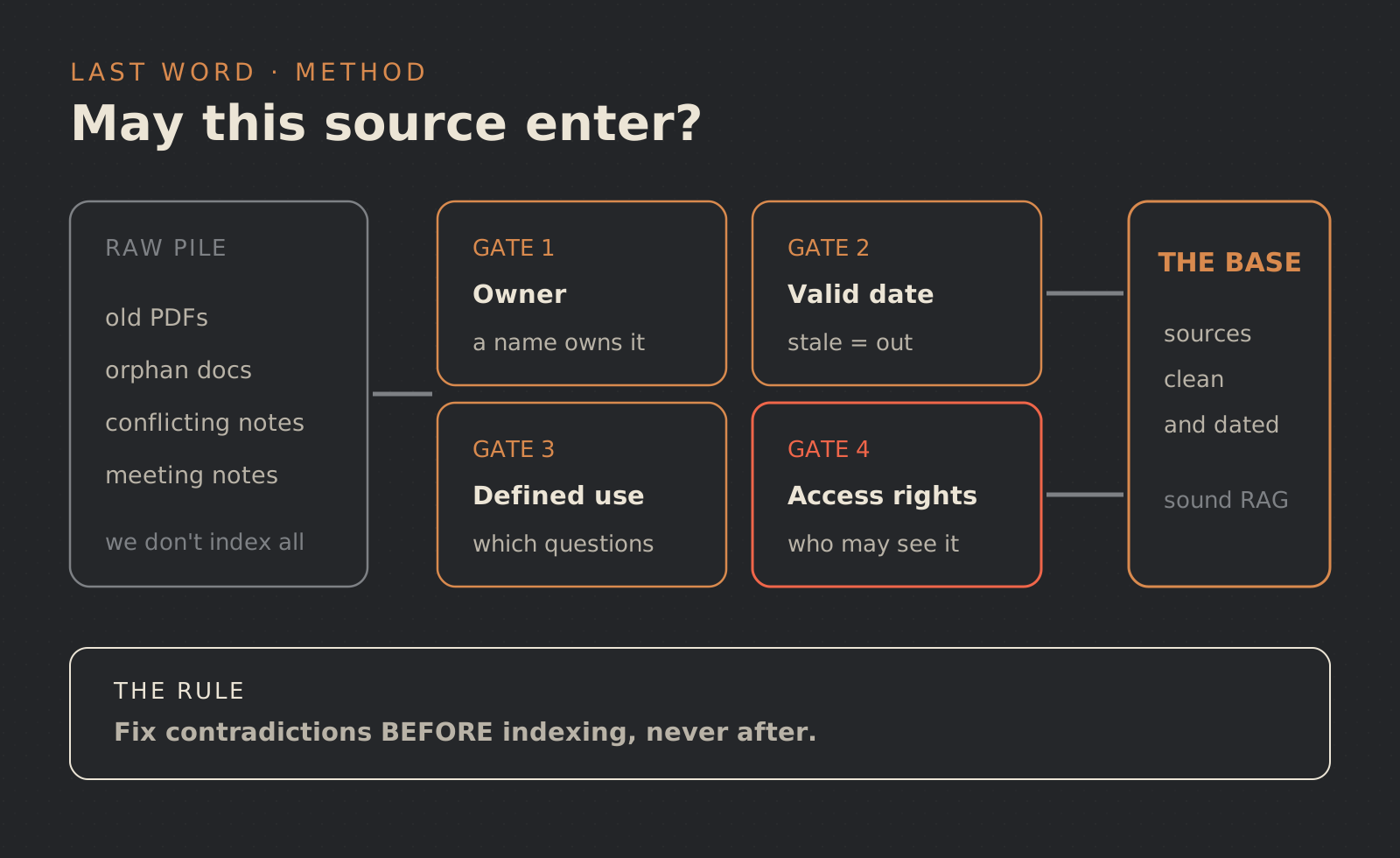
Is this source ready for the knowledge base?
Use this decision card before adding a source to the pilot. Failing one gate does not always mean deleting the document. The team can clean it, restrict it or reserve its use for human review.
A useful knowledge base is not a bigger archive. It is a boundary the agent can cite and follow, then leave when the risk rises.
Test with realistic, de-identified requests
The pilot needs realistic cases without unnecessary exposure. Remove or replace names, contact details, identifiers and irrelevant details in the requests you use. Include sample procedures and situations that cover simple, incomplete, contradictory and out-of-scope cases. If someone could still re-identify a person, continue treating the test set as personal data and restrict access to it.
At a minimum, test whether the agent:
- uses only authorised sources;
- says when a source is missing;
- avoids turning a past exception into a general rule;
- displays or summarises the source when that helps the reviewer;
- escalates sensitive, contradictory and out-of-scope cases;
- keeps a record that makes errors understandable.
This is where human review in an AI workflow matters. At launch, the agent will often be safer preparing an answer than sending it. The value lies in faster preparation and a better handover, not theoretical autonomy.
Maintain a knowledge base that can age cleanly
A living knowledge base needs a simple routine: add, correct, remove, review errors and limit access. Without one, it becomes documentation debt connected to an agent that sounds very sure of itself.
Keep the maintenance rule understandable to the people doing the work. Who adds a source? Who approves a change? Who removes an obsolete document? Who reviews errors raised by the agent? Who can stop the flow if it starts drifting?
This governance does not need to be heavy. It does need to exist before the pilot expands.
FAQ
Do we need a perfect knowledge base before building an AI agent?
No. You need a dependable first scope: a few useful, current and authorised sources, tested against realistic and de-identified requests, with clear escalation rules.
Does RAG eliminate hallucinations?
No. It can reduce some risks by giving the model passages from defined sources, but the model can still misread them or answer beyond the supplied context. Limit permissions, show useful sources, test the responses and provide a human stop.
Which documents should we avoid at the start?
Avoid documents that are obsolete, contradictory, sensitive without a clear purpose, ownerless, or capable of triggering a risky decision without human approval.
How Last Word would frame the project
Last Word can scope an AI agent around your actual sources: boundaries, permissions, stop rules, a focused pilot, human review and the first testable feedback loops. If you want to connect an agent to company documents without creating a black box, start with our AI agent services or send us the context.
Sources
Footnotes
-
CNIL, “Comment déployer une IA générative ? La CNIL apporte de premières précisions” (How to deploy generative AI: initial guidance), 18 July 2024, https://www.cnil.fr/fr/comment-deployer-une-ia-generative-la-cnil-apporte-de-premieres-precisions ↩ ↩2
-
CNIL, “IA : Garantir la sécurité du développement d’un système d’IA” (Securing AI system development), 22 July 2025, https://www.cnil.fr/fr/ia-garantir-la-securite-du-developpement ↩
-
ANSSI / MesServicesCyber, “Recommandations de sécurité pour un système d’IA générative” (Security recommendations for a generative AI system), 28 April 2024, https://messervices.cyber.gouv.fr/guides/recommandations-de-securite-pour-un-systeme-dia-generative ↩
-
France Num, “Génération augmentée par récupération (RAG) : guide pour exploiter les données de sa TPE PME avec l’IA générative”, published 3 December 2024 and updated 17 August 2026, https://www.francenum.gouv.fr/guides-et-conseils/intelligence-artificielle/recherche-intelligente-et-analyse-documentaire-0 ↩