Useful AI in a business should not have a free hand. It should work inside a clear workflow: what it reads, what it proposes, what it executes, and what it hands over to a human.
Human review is not a brake on the project. It is often what makes production possible without turning an assistant into an operational risk. For an AI support agent or a process automation project, the real question is not “should we review?” The real question is where control belongs so it actually improves the workflow.
Human review should sit where it changes the risk
Reviewing everything exhausts the team. Reviewing nothing exposes the customer. Put control where a mistake becomes expensive.
Where control belongs
Human review should not sit at the end like an administrative stamp. It belongs where risk changes: sensitive data, external messages, financial decisions, irreversible actions.
Draw the workflow with blocking points before choosing the model. Control is part of the product, not a patch.
Where human control actually matters
Put humans where mistakes are expensive, where the rule is ambiguous and where the action is hard to reverse. Let AI prepare, classify, summarise, extract and propose. Allow automatic execution only when the scope is simple, observable and reversible.
A good AI workflow with human review has four core elements:
- a clearly defined input;
- explicit stop rules;
- a fast validation interface;
- logs that explain what was proposed, validated, corrected or refused.
Without these elements, validation becomes a checkbox. With them, it becomes a real quality-control mechanism.
The wrong reflex: reviewing everything
Many teams begin with a cautious setup: the AI proposes, a human reviews everything. That is reassuring at first, but it is not always sustainable.
If every output needs a full review, the team may not gain much. It replaces production work with supervision work. That can still be useful during launch, but only if you know why the step exists and when it can be reduced.
The goal is not to remove humans everywhere. The goal is to stop asking people to validate things with no real stakes. Human judgement should be used where it adds value: arbitration, risk, client nuance, commercial decisions, compliance and exceptions.
Decision matrix: automate, validate or block
Use this matrix before building the workflow. It helps choose the right level of control without a theoretical debate.
Simple information from a reliable source
Example: Summarising a recent internal note AI role: Summarise or rephrase Recommended control: Human sampling
Structured data and reversible action
Example: Creating an internal task AI role: Extract then create Recommended control: Automatic with log
Free text with customer impact
Example: Drafting a support reply AI role: Propose a response Recommended control: Human validation before sending
Missing or contradictory data
Example: Customer not found, two different statuses AI role: Flag the blockage Recommended control: Human escalation
Sensitive action
Example: Refund, contract change AI role: Prepare the file Recommended control: Mandatory human decision
Out of scope
Example: Legal request, conflict, threat AI role: Refuse or escalate Recommended control: Block and transfer
Adapt the matrix to your business. The important thing is to name the zones. If everything is “case by case”, the workflow is not ready.
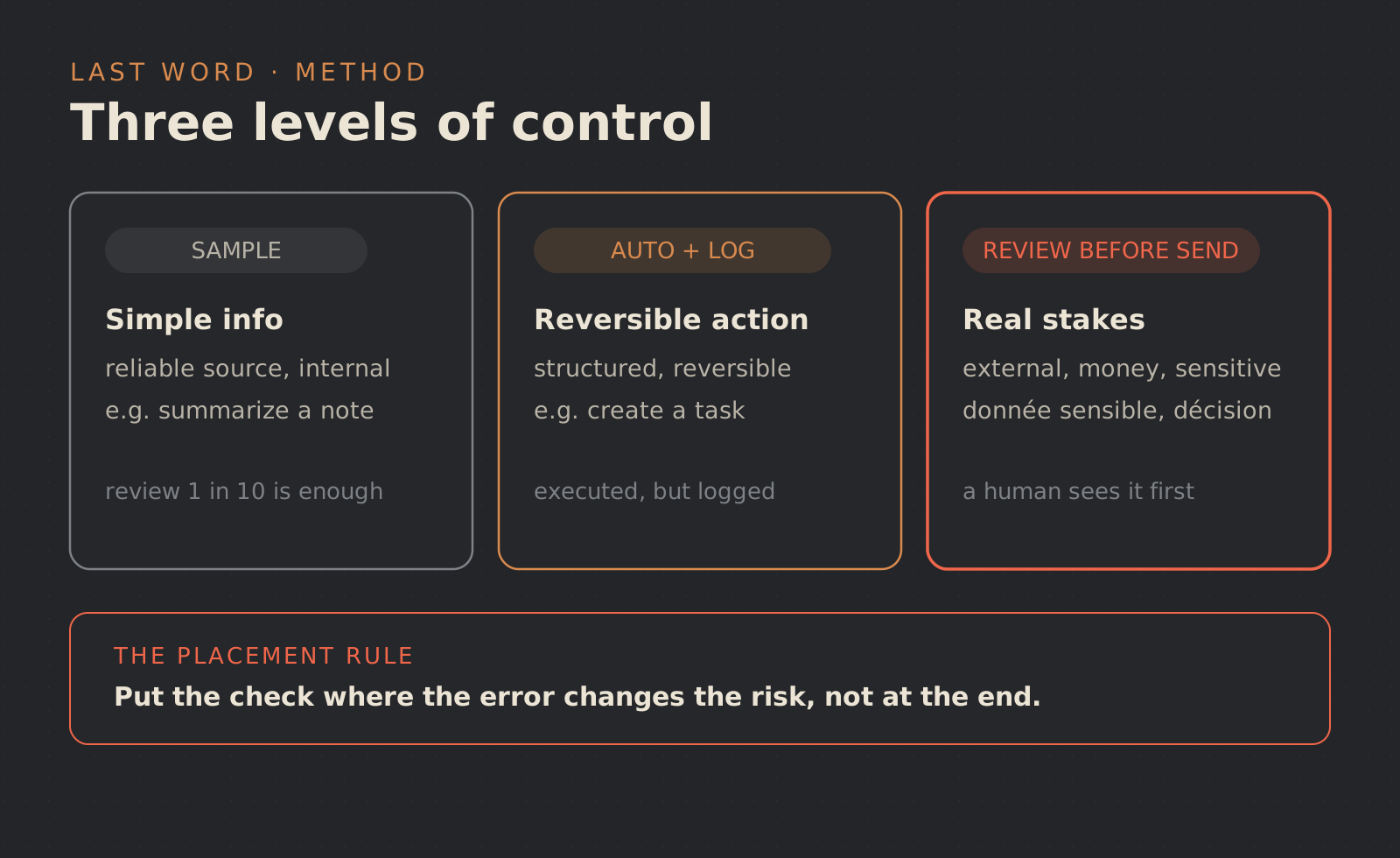
The three levels of validation
Human review does not always mean the same thing. There are at least three useful levels.
First level: validation before action. The AI prepares, the human clicks, edits or refuses. This is the safest launch mode, especially when the workflow touches a customer, invoice, contract or sensitive data.
Second level: validation by exception. The AI handles simple cases and escalates anything outside the frame. This requires strong stop rules: low confidence, missing source, inconsistency, sensitive keyword, unusual amount, VIP customer, aggressive request.
Third level: after-the-fact audit. The AI executes, then a human checks a sample or flagged cases. This only fits reversible and well-logged actions. It should never be used to hide poor framing.
Where to place control in the workflow
A typical AI workflow contains several possible control points.
Input
Is the request in the right channel and format? Filter or reject automatically.
Understanding
Is the intent clear? Ask for clarification or escalate.
Sources
Are the consulted data sources authorised and up to date? Use an allowlist.
Proposal
Does the answer or action comply with the rules? Apply human validation or a business rule.
Execution
Can the action be undone? Add thresholds, confirmation and logging.
Follow-up
Can the team understand what happened? Keep a usable log and status.
Control placed too late looks like error correction. Control placed in the right place prevents the error from moving deeper into the system.
What the validator needs to see
A validation interface should not only display a generated answer. It should give the context needed to decide quickly.
Minimum checklist:
- original request;
- detected intent;
- sources used;
- proposed response or action;
- reason for confidence or doubt;
- rules applied;
- approve, edit, refuse and escalate buttons;
- short correction field;
- history of similar decisions, when available.
If the human has to open three tools to check the proposal, the workflow is badly designed. Validation must be integrated into the process, not added as a layer of stress.
Stop rules must be written down
An agent or AI workflow needs to know when to stop. This matters more than conversational fluency.
Common stop rules include:
- missing source;
- contradictory information;
- uncertain identity;
- out-of-scope request;
- aggressive or legal content;
- irreversible action;
- unusual amount, deadline or commitment;
- insufficient internal confidence;
- repeated error in the same category.
These rules can evolve. But they must exist from the pilot. Otherwise the AI will improvise where the business should have decided.
Log without drowning the team
Logs are not decorative. They help the team understand decisions and improve the workflow.
A useful log records the received input, detected intent, sources consulted, proposal, human decision, any correction, action executed and final status. It should also distinguish between an AI error, a missing rule and incorrect source data.
That distinction changes everything. Fixing a prompt is useless if the knowledge base is obsolete. Adding a rule is useless if nobody maintains the source.
Start small, but correctly
The right first scope is narrow: one category of requests, one channel, a few actions and clear validation. Examples include preparing replies to recurring requests, classifying incoming forms, creating internal tasks from emails, or extracting information from a document before review.
A limited scope tests the real subject: the quality of the workflow. AI is only one component. The full system must show how it receives, decides, stops, traces and improves.
Last Word can help frame this kind of pilot: business rules, workflow, validation interface, logs and a gradual move toward more automation when the risk is controlled. If you have a process to turn into a controlled workflow, the entry point is simple: contact.
Useful control in four places
- Before action: block sensitive or incomplete cases.
- During validation: show sources, reason and proposed change.
- After correction: feed recurring errors back into the rules.
- At shutdown: know how to pause automation when the signal drifts.
FAQ
Does human validation cancel the value of AI?
No. If AI prepares the context, extracts the data and drafts a clean response, the human saves time while keeping the decision.
When can a workflow become automatic?
When simple cases are stable, errors are visible, actions are reversible and stop rules are reliable. Not before.
Should every response be validated at the start?
Often yes, on a narrow scope. But that phase should produce rules, not become a permanent habit.
What if validators correct a lot?
Classify the corrections. Some come from the model, some from the sources, and some from a missing business rule. The improvement plan depends on the cause.