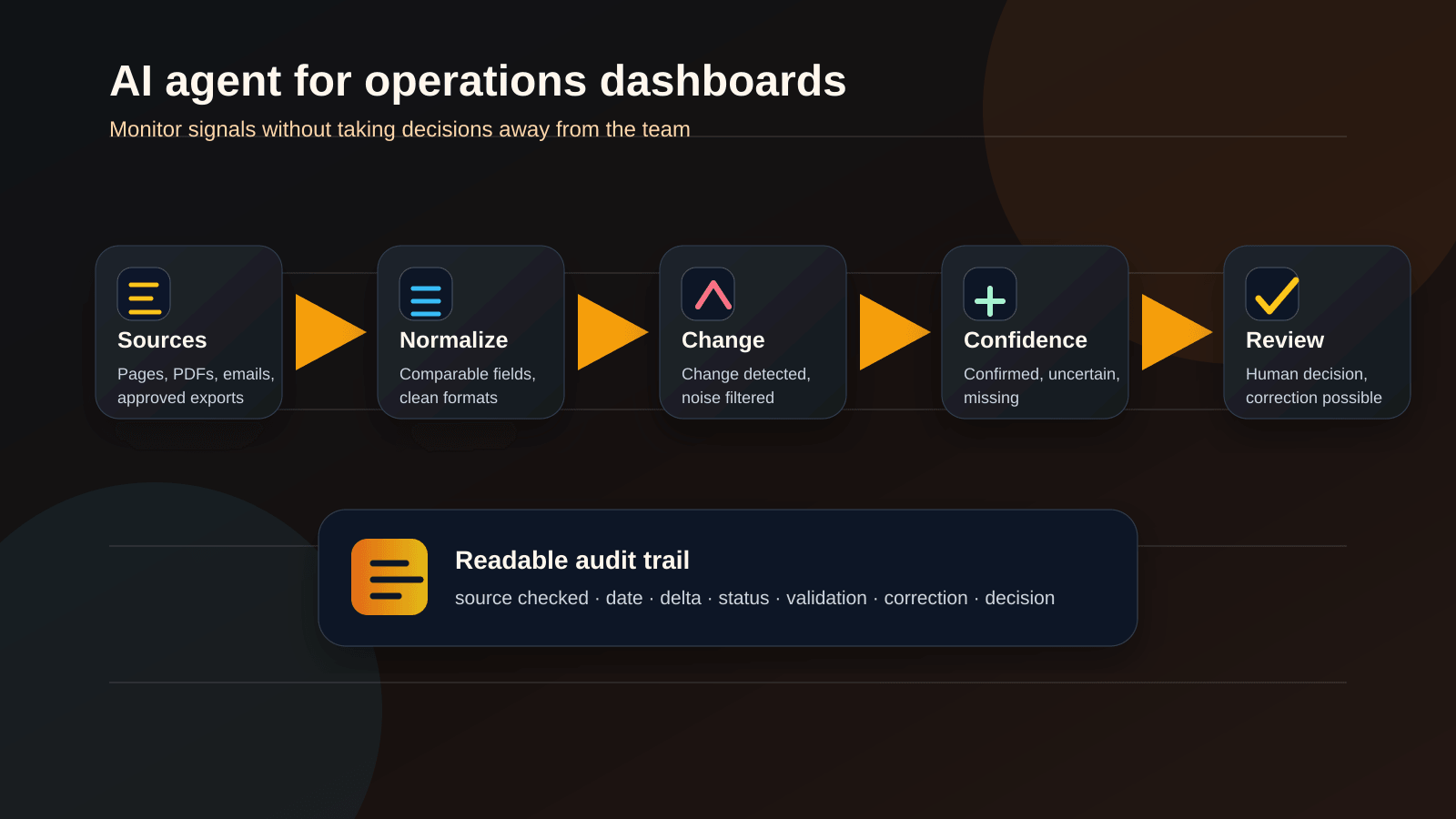
An AI agent does not have to look like a chatbot to be useful. In many small and mid-sized businesses, the best first use case is quieter: watch authorised sources, detect what changed, prepare a comparison, flag missing data and let a human make the decision.
That matters for business operations teams that live with moving information: procurement notes, pricing pages, supplier documents, catalogue exports, operational indicators, internal spreadsheets, public pages, changing terms or recurring exceptions. The hard part is often not “generating content”. It is noticing the right change before it disappears inside a dozen tabs and email threads.
A good operations agent does not replace the buyer, manager or domain expert. It prepares the ground. It makes changes visible. It keeps the trail. It prevents an important decision from relying on an outdated spreadsheet, a forgotten screenshot or an intuition nobody can verify.
The useful promise is not “the agent decides for you”
The useful promise is more disciplined: the agent monitors, consolidates, qualifies and documents. The business decision stays human.
The operational problem: small signals scattered everywhere
Most non-technical teams already have the information they need. The issue is that the information is fragmented, irregular and hard to compare.
Typical sources include:
- product or pricing pages that change without a clean notification;
- PDFs or catalogues updated on their own rhythm;
- supplier or partner emails;
- internal spreadsheets with inherited columns;
- exports from several tools;
- business rules known by a few people but rarely documented;
- weak signals that only matter once they repeat.
The usual answer is to add one more spreadsheet. Then a “to check” tab. Then a colour for urgency. Then a person responsible for reading everything again. That can work when the scope is small. It becomes fragile as soon as the number of sources grows.
An AI agent can help only if its role is narrow: monitor, structure, compare, explain and escalate. Not decide alone.
What the agent can actually do
For a procurement or pricing intelligence dashboard, the agent can support several parts of the workflow.
Monitor
Follow authorised sources, detect useful modifications and separate a real business change from layout noise.
Normalize
Turn mixed formats into comparable fields: reference, category, date, status, source and review comment.
Compare
Prepare a short delta: price changed, option added, availability moved, term updated, data missing.
Escalate
Surface only the cases that deserve a human read, with a short reason and the source attached.
Document
Keep the history: source checked, date, missing field, human correction, final decision and next review.
The AI part is not always spectacular. It may read imperfect content, recognise a category, summarise a variation or mark that a field is not reliable enough. The rest is process automation: triggers, connectors, permissions, statuses, logs and recovery when something breaks.
A safe first workflow
A reasonable operations intelligence flow can look like this:
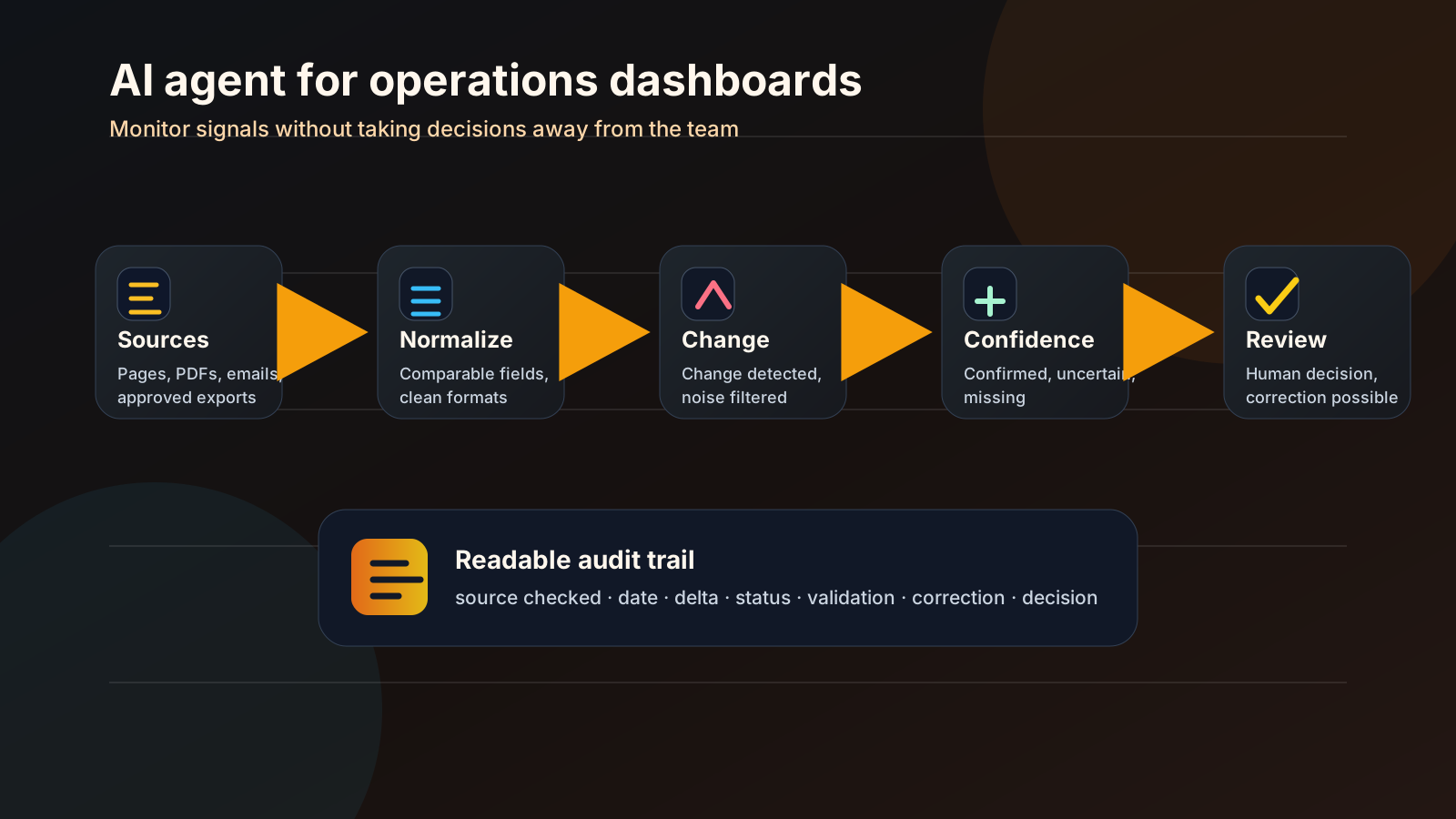
- the system retrieves an authorised source or receives a file;
- it extracts the useful fields and highlights uncertain zones;
- it compares the result with the previous state;
- it ranks the changes by importance and confidence;
- it displays source, freshness and missing-data status;
- it asks for human validation when the case is sensitive;
- it stores what was confirmed, corrected or ignored.
This pattern can serve procurement monitoring, supplier follow-up, pricing intelligence, catalogue review, document surveillance, tender preparation, regulatory watch or operational meeting prep. The exact topic matters less than the mechanism: multiple sources, changing data, a human decision to prepare.
If the sources are public or contractually accessible, a web scraping component may be part of the system. If the sources are internal, the harder questions are permissions, export quality, retention and traceability. In both cases, the rule is the same: the agent must not invent a value that is missing.
Where to place autonomy
Before building the dashboard, decide how much autonomy is acceptable. The question is not “can we automate this?”. The question is: how far can we automate without losing business control?
| Level | Agent role | Human role | Good candidate | Main risk |
|---|---|---|---|---|
| Monitoring | Signal that a source has changed | Read and decide | Many sources, frequent changes | Too many low-value alerts |
| Pre-analysis | Summarise the delta and missing fields | Confirm the interpretation | Repeated comparisons | Overconfident summary |
| Recommendation | Suggest a priority or action | Validate or reject | Explicit business rules | Misunderstood rule |
| Execution | Trigger an action in a tool | Approve before or after depending on risk | Limited, reversible actions | Action launched too early |
For a first project, the first two levels are often enough. They already reduce manual checking, missed updates and blind spots. Recommendation and execution require stronger framing, especially when the action touches spending, supplier relationships, pricing decisions or sensitive data.
Non-negotiable safeguards
A business operations dashboard with an AI agent should be designed as a decision-support system, not as a black box.
- Visible sources: every summary should link to the source, extract or controlled record that supports it.
- Explicit freshness: old data must be labelled as old, not mixed with recently verified data.
- Confidence status: confirmed, uncertain, missing, needs review, corrected by human.
- No invention: when a value is absent, the agent should create a review state, not guess.
- Audit trail: date, source, detected change, validation, correction and final decision.
These safeguards can matter more than the model choice. A modest agent with clear traces is easier to use than an impressive agent that nobody can verify.
Prototype checklist
A useful prototype starts with a tight scope. Before connecting tools, check the basics.
- The business process can be described on one page.
- The authorised sources are listed clearly.
- A business owner is named.
- The fields to track are defined.
- Sensitive data that should not be stored is identified.
- The update frequency is realistic.
- Missing data and unavailable sources have a status.
- Alerts have a threshold and an owner.
- Irreversible actions are excluded from the first scope.
- The audit trail can be read by a non-technical user.
If several items are missing, the project is not ready for automation. That is useful information. It prevents the team from building a beautiful dashboard that nobody can operate.
Common mistakes
The first mistake is connecting too much too early. An agent that monitors twenty poorly understood sources will mostly create twenty ways to be wrong. Start with two or three representative sources, learn the exceptions, then expand.
The second mistake is treating a summary as proof. A summary helps people read faster. It does not replace the source. For procurement, pricing or operational priorities, the user should be able to go back to the original information.
The third mistake is removing the human in the wrong place. If a decision carries budget, contractual or reputational weight, the agent can prepare the recommendation. It should not silently impose it. The interface should make validation easy, not invisible.
The fourth mistake is forgetting maintenance. Sources change. Rules evolve. Columns disappear. Suppliers redesign pages. Internal exports move. A business agent needs an owner, failure alerts and a recovery procedure. Otherwise it becomes one more spreadsheet, just harder to debug.
What to measure without inventing ROI
An operations dashboard can save time, but the first pilot does not need inflated percentages to be valuable. Separate what you can measure immediately from what needs a real pilot.
Reasonable pilot indicators include:
- number of sources monitored;
- number of changes detected;
- share of changes judged useful by the team;
- time spent reviewing alerts;
- number of missing or uncertain data points;
- number of human corrections;
- time between detected change and business decision.
The goal is not to prove a spectacular return after one week. The goal is to answer practical questions: which alerts are useful, which are ignored, how often the agent needs correction, and which decisions became faster or safer because the signal was visible.
This is close to the discipline of reliable monitoring: alerts should be actionable, low-noise and connected to an owner. For the AI layer, the same logic applies. Trust comes from risk management, traceability and evaluation over the life of the system, not from a confident demo answer.
Where Last Word can help
This kind of project rarely fits into a single box. It can combine authorised scraping, process automation, a lightweight database, an AI agent, an internal interface, logs and dashboard design. That is precisely the territory of a custom AI workflow: start from one real operational problem, reduce the scope, build a controlled prototype, then decide whether the agent deserves more autonomy.
Last Word can help at three levels: framing the process, building the prototype, and making the system observable enough to maintain. The objective is not to add AI everywhere. It is to surface the right signal at the right time, with enough context for a human to decide.
FAQ
Can an AI agent automatically make a procurement decision?
Technically, some actions can be automated. In practice, this is a poor first goal. When a decision affects spend, a supplier relationship, pricing or accountability, the agent should prepare the comparison and keep the evidence. Validation should stay human.
Should we start with the dashboard or the agent?
Start with the dashboard and the process. What should the team see? Which source is authoritative? Which status triggers action? The agent comes later to read, compare, summarise or escalate exceptions.
Can web scraping feed this type of intelligence dashboard?
Yes, when the sources, access rights, terms, server load and legal context allow it. Scraping is not a shortcut. It is a technical component that needs clean scope, caching, reasonable frequency, logs and error handling.
How do we prevent the agent from hallucinating business data?
Design the system to accept missing information. An absent value should become a “needs review” status, not a guessed value. Sources should remain visible, uncertain fields should be marked, and human corrections should be stored.
The point to keep
The AI agents that help non-technical teams are not always the ones that talk the most. Often, they observe, classify, compare and explain without pretending to own the decision.
For a small or mid-sized business, the right starting point is not a large autonomous agent. It is a small reliable system: a few sources, clear statuses, low-noise alerts, an audit trail and human validation. If that foundation already improves visibility, the agent can take on more work later. If it does not, the process needs to be clarified before more AI is added.
To scope this type of operations intelligence dashboard, start with a short audit: sources, rules, risks and a first prototype path. The entry point is here: contact.