A small business can choose the wrong tool. The bigger mistake often happens one step earlier: choosing the wrong type of solution.
A simple rule is not enough when the process is full of exceptions. A no-code scenario becomes risky when nobody can test it or read its logs. AI creates noise when the business rule is still unclear. A custom workflow is overkill if the team only needs one reliable trigger and a manual fallback.
Instead of asking “should we add AI?”, identify the repeated action that needs to become more reliable and the level of control it requires. That is the starting point for a solid process automation project.
The best choice is often the simplest one that will hold
If a clear rule is enough, do not add AI. If no-code is enough but breaks at the third exception, tighten the scope. If custom work is needed, it should protect the process, not turn it into a machine nobody wants to maintain.
Start with the repeated action, not the software
Before comparing AI, no-code and custom development, describe the real action. Who receives the information? Where is it checked? What output is produced? What happens when the data is missing, when two tools disagree, or when the case does not follow the normal path?
This feels slower than opening a tool and building a scenario. It saves time. Automation should not accelerate confusion. It should make one piece of work easier to understand, easier to repair and safer to hand over.
A good first scope usually fits in one sentence: “when this signal arrives, check this data, prepare this output, then validate or execute this action”. If the sentence needs five exceptions, three owners and a meeting to explain it, the topic is not ready for automation yet.
Option 1: keep a simple rule
A simple rule is often underrated. It works when the process is stable, explicit and leaves little room for interpretation: send an alert when a field is empty, create an internal task from a status, block a request when required information is missing, or route a form based on a clear category.
Its advantage is obvious. Everyone can understand what happens. Maintenance stays light, and errors are quick to diagnose. For a small business, this may be the best first automation because it removes friction without creating a heavy dependency.
The warning sign is the growing list of patches: “except when”, “except for this customer”, “except on Friday”, “except if the attachment contains this term”. At that point, the process may need to be split, reviewed or moved to a more structured workflow.
Option 2: use no-code
No-code is useful when the tools already connect, volumes are reasonable and errors are recoverable. Syncing forms, creating tasks, sending internal notifications, enriching a record or triggering a simple follow-up can all be good candidates.
The risk is not no-code itself. The risk is the invisible scenario that nobody wants to touch anymore. A small business can end up with a critical automation owned by one person, with unclear logs, no test environment and no answer when a connector changes. The OWASP Citizen Development Top 10 covers authorization misuse, sensitive-data leakage, vulnerable components, asset-management failures, and missing security logging among the risks associated with these tools.
Treat no-code like a small internal product. Name an owner. Document the trigger. Limit access. Plan error handling. Keep a manual route. If that sounds excessive, the process may need to stay simpler for now.
Option 3: add AI inside the workflow
AI becomes useful when the input is not perfectly structured: a long email, a customer request, a document, an internal note, a web page, a support ticket or a conversation. It can read, summarise, classify, extract, rewrite or prepare an answer.
But AI does not replace a missing business rule. If nobody knows how to decide an ambiguous case, the model will not magically know either. It will only produce a more fluent answer to a poorly framed problem.
The safer pattern is to put AI inside a controlled workflow: authorised sources, stop rules, human review for sensitive actions and logs people can understand. The NIST AI Risk Management Framework calls for documented roles, human oversight, testing, monitoring, and response or shutdown procedures proportionate to the risk. The article on AI workflows with human review explains how to apply that idea. The human should intervene where judgement changes the risk, not reread every harmless output by habit.
Reasonable examples: suggest a category for an inbound request, summarise a file before review, extract fields from a document, prepare an internal reply, or flag a mismatch between two sources. In those cases, AI prepares. The workflow decides what may be executed, reviewed or blocked.
Option 4: build a custom workflow
Custom work makes sense when integrations, permissions, logs, performance, recovery or exceptions make shortcuts fragile. The reason to build it is reliability, not prestige.
A custom workflow can be simpler to operate than a stack of no-code scenarios if the business needs a clean interface, clear roles, usable history, testable rules or a stable connection between several systems. That is where a custom project can avoid operational debt.
The opposite mistake is also common: building too early. If the process changes every week, if users are not sure what they need to validate, or if the volume is low, a lightweight prototype may be enough. Custom work should protect a loop the team already understands. It should not hide the fact that the process has not been scoped.
Decision module: choose the simplest path that will hold
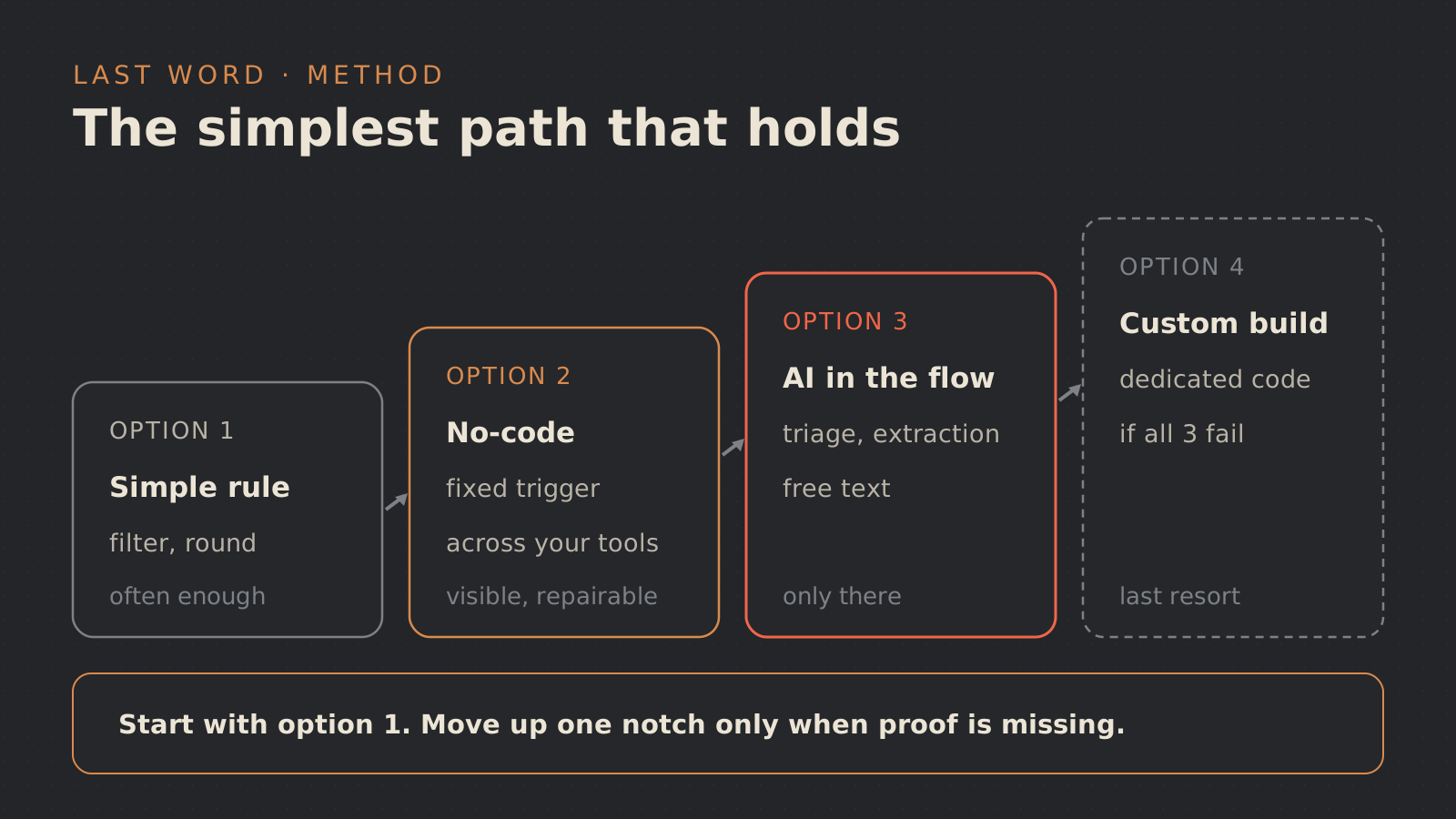
At this stage, the decision should fit on one page: what signal starts the work, how much ambiguity is acceptable, who takes control when needed, and what trace explains what happened?
Use this map as a filter, not as an automatic answer. If two paths look possible, start with the one that leaves more control and less operational debt. Harden only what actually breaks during a pilot.
Warning signs before connecting anything
Some signals should slow the project down, even when the tool looks obvious.
- Sensitive data: limit access, avoid unnecessary copies and clarify retention; the CNIL covers these principles in its general guide to AI and GDPR compliance.
- Too many exceptions: separate simple cases from cases that need review.
- No validation point: decide where a person intervenes before the pilot starts.
- Single owner: document the workflow and share maintenance.
- No manual fallback: keep a clear way to handle cases if the automation fails.
This connects to a broader rule: automate without breaking the process. The system must remain observable, repairable and understandable by the team that uses it. For a deeper method, read how to automate a process without breaking it.
How to start small
Map one real loop: one request, one check, one output, one owner. Then choose a small batch of recent cases, not perfect examples prepared for the demo. Include incomplete files, duplicates, contradictory information and sensitive cases.
Build a first version that observes or prepares. Add automatic execution only for simple, reversible and well-logged cases. Expand only if the team understands the errors, corrects the rules and knows how to take control again.
This progression avoids two bad extremes: refusing automation out of fear, or handing a poorly understood process to a shiny tool too early. For a small business, the best project is often a modest first loop that is useful, visible and maintainable.
Last Word can help choose that first loop: process framing, choice between a simple rule, no-code, AI or custom workflow, testable prototype and production guardrails. If you have a repetitive process but are not sure which path fits, start here: process automation or contact.
Sources
Links checked on 25 August 2026. These references support the governance and risk points; the decision framework is a Last Word editorial method, not a quantitative benchmark.
- AI Risk Management Framework Core, NIST, version 1.0 (2023), currently under revision.
- Citizen Development Top 10, OWASP, risks covering low-code, no-code and AI-assisted tools.
- AI: ensuring GDPR compliance, CNIL, principles for systems that process personal data across development, training and deployment.
FAQ
Do small businesses always need AI to automate?
No. If the rule is clear and the data is structured, a simple or no-code automation may be more reliable, easier to read and easier to maintain.
When does no-code become risky?
When the scenario becomes critical, poorly documented, hard to test, owned by one person or dependent on many exceptions. The idea is not necessarily bad, but it needs stronger framing.
When should we choose custom automation?
When the business needs precise permissions, logs, error recovery, specific integrations or a clear internal interface. Custom work should protect the process, not simply replace a tool.
Where should human review sit?
Put it where a mistake would have serious consequences: an external action, sensitive data, a financial decision, a customer commitment, contradictory information or an out-of-scope case. The rest can often be prepared or automated with proper logging.