Invoice automation should make incoming documents easier to receive, check and route. It should not quietly decide that a purchase is legitimate or give software permission to release a payment.
That boundary matters more than the choice of OCR engine or accounts-payable platform. A small business needs to know which steps follow fixed rules, which cases require judgement, and who owns the final financial action. If those answers are missing, faster intake only moves an unclear decision downstream.
Automate the evidence trail and the routine checks. Keep approval and payment authority with named people.
Start with the control model, not the software category
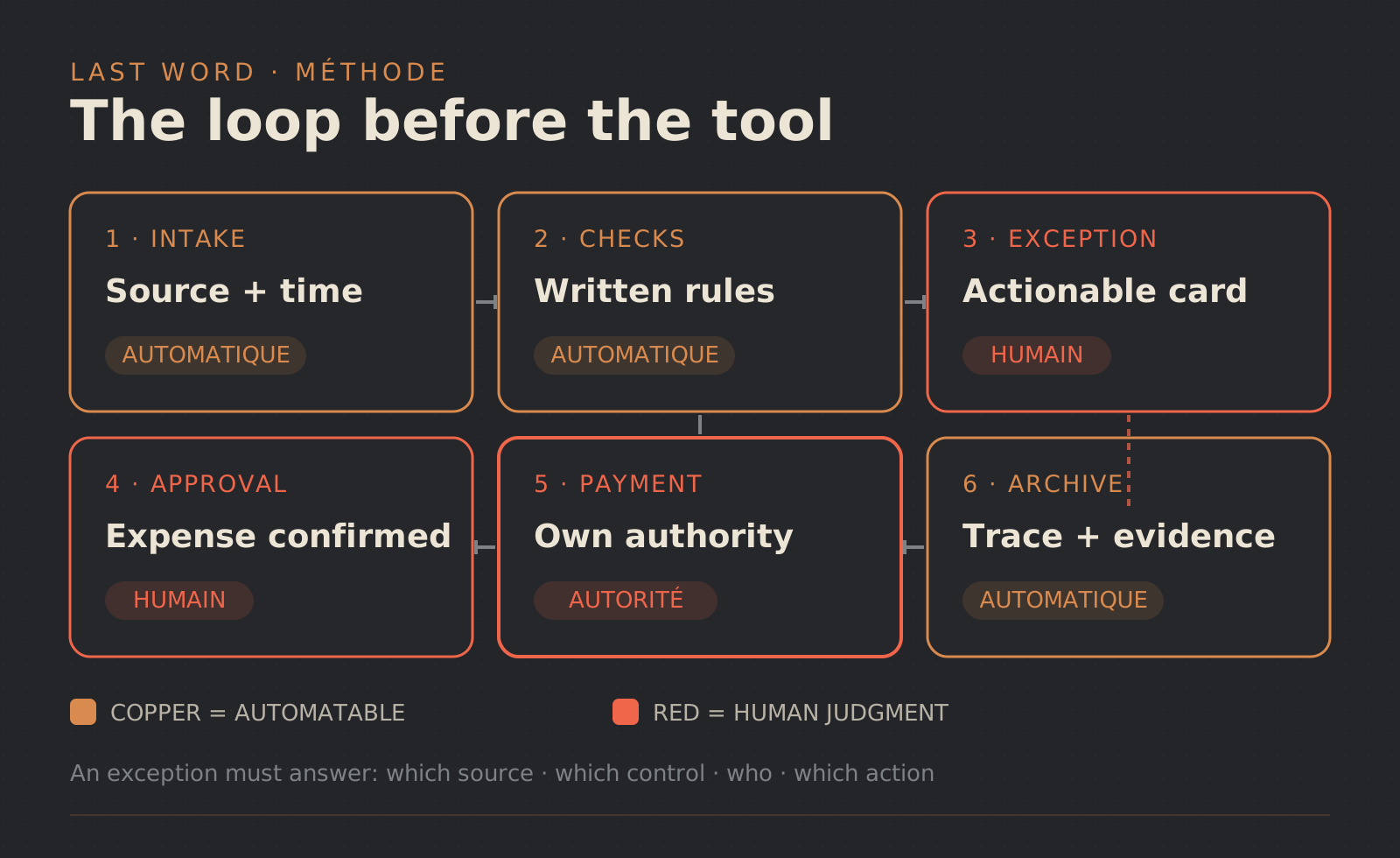
An invoice workflow has six distinct stages: intake, checks, exceptions, approval, payment and archive. Treating them as one feature called “invoice automation” hides the decisions that matter.
Intake records where the invoice came from and makes its data available. Checks apply rules the business has already defined. An exception pauses the normal route and sends the case to an owner. Approval confirms that the expense may proceed. Payment authority permits the financial action. The archive preserves the source, the checks and the decision.
A lightweight team may assign approval and payment to the same person. The workflow should still show them as separate events. That makes permissions easier to reason about and leaves a usable record when the team, tool or banking setup changes.
This article focuses on supplier invoices. For a broader way to choose a workflow, see process automation for small businesses. The guide to AI workflows with human review covers the same control principle across other kinds of work.
An eInvoice is structured data, not simply a digital-looking document
The European Commission’s eInvoicing definition describes an electronic invoice as one issued, transmitted and received in a structured data format that supports automatic electronic processing. It distinguishes that structure from PDFs, images and scanned documents processed with OCR.
That distinction affects the first step of the workflow. Structured data can remove the need to retype fields before running a check. It does not prove that the expense is expected, that changed supplier details are genuine, or that the invoice should be paid.
Rules also vary by jurisdiction. France provides a current, bounded example: businesses in scope must be able to receive electronic invoices from 1 September 2026, while French SMEs and micro-enterprises move to mandatory issuance from 1 September 2027. Those dates come from Service Public Entreprendre and the French tax authority’s reform hub. They are not a global timetable. A business operating elsewhere should check its own legal and tax requirements.
Put fixed-rule checks before judgement calls
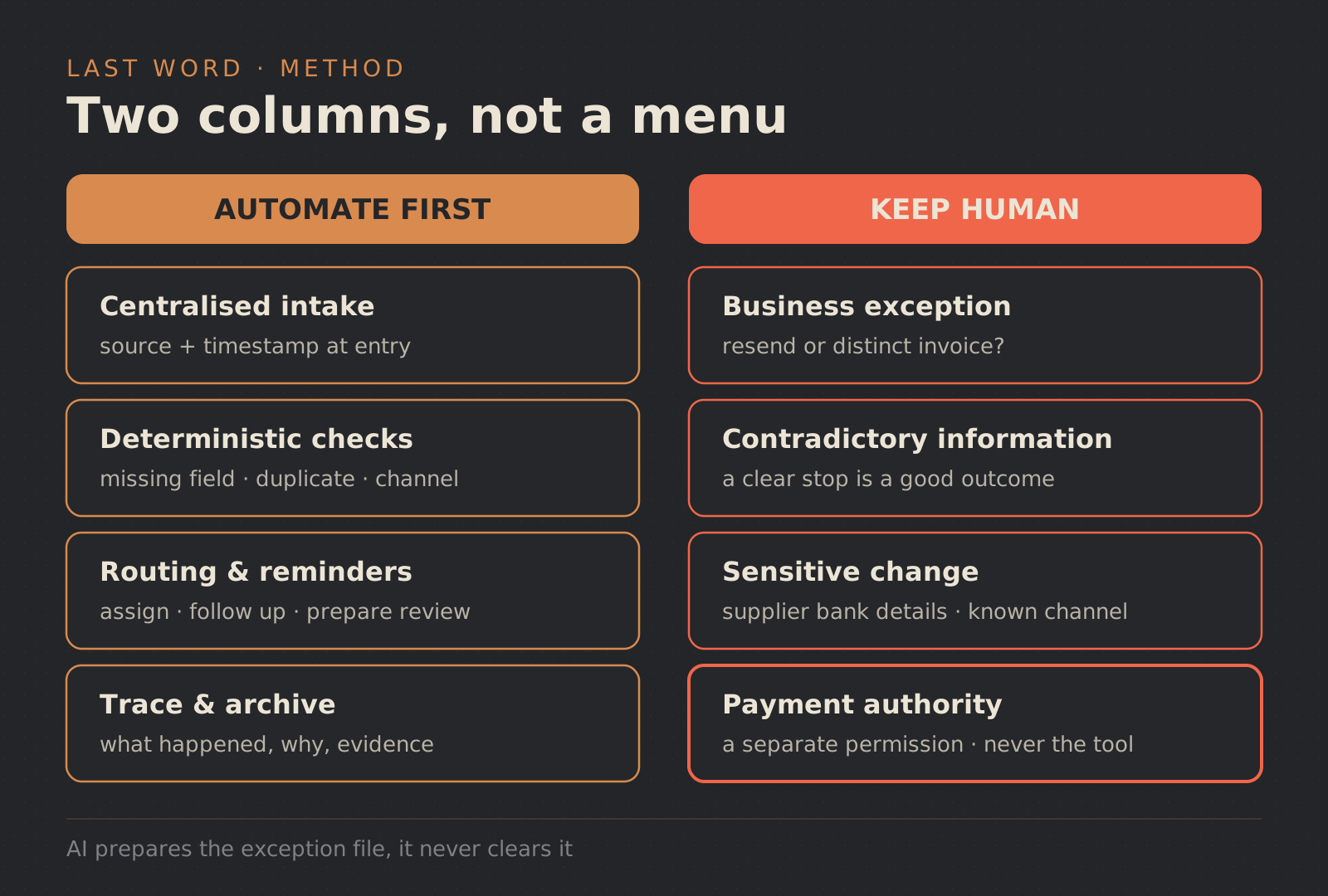
A deterministic check returns the same result from the same inputs. It can flag a missing expected field, compare a reference against an approved source, detect that an invoice identifier has already entered the system, or confirm that a document arrived through the intended channel.
Write the rule before implementing it. Define what evidence the check uses, what counts as a failure and where the case goes next. “Looks unusual” is not a deterministic rule. “Supplier account details differ from the approved record” is a condition that can open a review without pretending to know why the difference exists.
Routing is another good automation target. The system can assign an exception, notify its owner, issue a reminder and prepare the review record. Those actions organise work; they do not authorise the expense.
A failed check should remain failed. Do not fill a missing field with a plausible value or mark a source as verified when an integration was unavailable. “Unable to check” is a useful outcome when it triggers the right fallback.
Design the exception queue as a working record
An exception needs more than a red status. The reviewer should see the source, the rule that stopped the invoice, the available evidence, the named owner and the next action. The record should also show whether payment is blocked and who resolved the case.
Use these four generic cases when testing the design. They reveal whether the workflow can stop safely without exposing a real invoice or supplier.
Possible duplicate
Show which identifiers were compared and when each item arrived. The owner decides whether the second item is a resend or a separate invoice. The workflow asks for a confirm-or-reject decision and keeps payment blocked until that decision is recorded.
Missing expected field
Show the missing field and the rule that requires it. The owner requests a corrected document or routes the case under the business’s documented process. The system does not invent a value, even if an AI model produces a confident guess.
Changed supplier details
Show the received detail beside the approved reference and identify the difference. An authorised person verifies the change through a known channel under the company’s own procedure. The workflow does not update the master record or release payment automatically.
Unavailable source or failed integration
Keep the technical error, the last useful attempt and the state known before the failure. The owner chooses whether to retry, wait or use the manual route. The invoice cannot carry a “checked” status for a check that never ran.
This is where a reversible design pays off. Automating a process without breaking it requires a manual route, readable logs and a clear owner before the connector becomes operationally important.
Human review belongs where judgement changes the risk
Review every invoice manually and the queue becomes a rubber stamp. Remove review entirely and exceptions inherit authority they were never meant to have. The practical middle is to place human attention where a decision changes the risk.
That includes an unfamiliar expense, contradictory evidence, sensitive supplier-detail changes, a missing source or the action that releases payment. The reviewer should receive a prepared case rather than hunt through several systems. They also need explicit options: approve, reject, request more evidence or return the invoice to a manual path.
Payment authority deserves its own permission and event. An approval can state that the expense is valid under the business’s process. A separate action can release the payment. Keeping the two visible prevents a routing rule, extraction model or exception handler from acquiring financial authority by accident.
Use AI to prepare, not to close, the case
AI can help when the input is not structured. It may propose extracted fields from a document, summarise correspondence or suggest an exception category. The reviewer must still be able to open the source and see that the output is a proposal.
Set hard stops outside the prompt. The model should not create a missing invoice value, dismiss a possible duplicate, accept new supplier details or release payment. Permissions and workflow state should enforce those boundaries even if a model returns the wrong instruction.
AI confidence is not business approval. When evidence is missing or contradictory, the useful output is a routed exception with a clear reason.
Run the workflow in shadow mode first
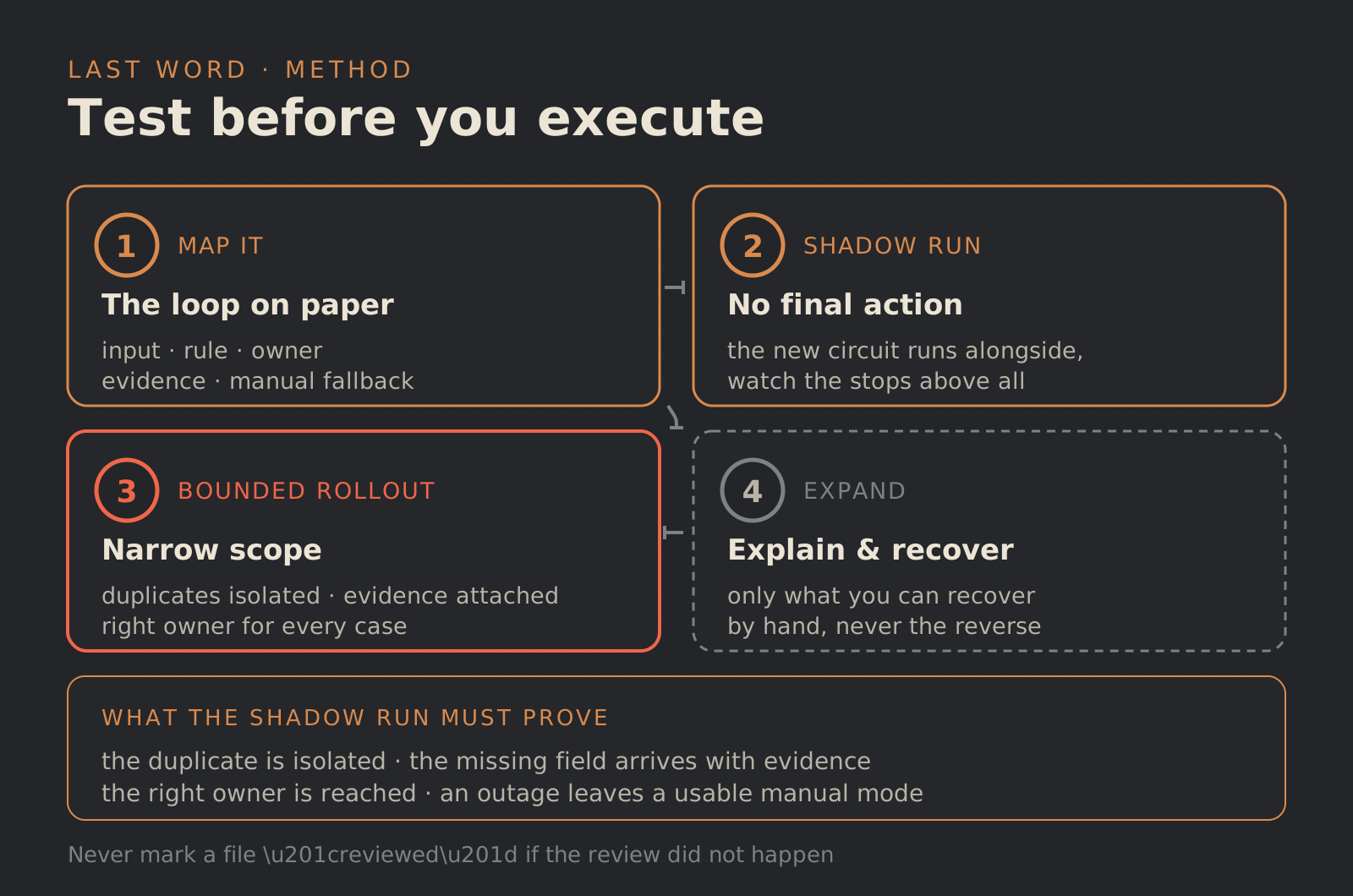
A shadow run processes invoices without controlling the final action. The team compares the proposed route with the real process and studies where the system stops. The goal is not to produce a universal accuracy score. It is to learn whether the workflow creates an understandable case when normal handling is unsafe.
Test at least the four exceptions above. Can the team see why a duplicate was flagged? Does the missing-field case reach the right owner? Is a supplier-detail change held before any update or payment? When a source fails, can staff continue manually without losing the record?
Move a step into live execution only when the team can explain its rule, inspect its evidence and recover from failure. Expand one bounded loop at a time.
Questions to ask before choosing an invoice platform
A product demo should use your control model rather than a perfect sample invoice. Ask the vendor or implementation team:
- Which structured and unstructured intake channels are supported?
- How are validation rules defined, changed and tested?
- What does a user see when a field or source is missing?
- How are duplicates and other exceptions assigned?
- Can preparation, approval and payment permissions be separated?
- Does the audit record connect the source, the check and the decision?
- How are invoice data and attachments protected and retained?
- What happens when a connector or reference system is unavailable?
- Can the team switch to a documented manual route?
- Can it export the decision history if the tool changes?
Preparing invoice intake but still unclear on exceptions and approval? Map one controlled loop, receipt, checks, exception owner and payment authority, before connecting a larger tool. Last Word helps small businesses frame and test this kind of process automation. You can also send us the workflow you need to clarify.
FAQ
Does electronic invoicing remove human approval?
No. Structured intake can make data available for automatic checks, but the business still owns exception handling, expense approval and payment authority.
What should a small business automate first?
Start with centralised intake, explicit field checks, duplicate detection, routing, reminders and an evidence trail. Include an exception route and a manual fallback from the first version.
Can AI approve an invoice on its own?
AI can extract, classify or summarise information for review. It should not invent missing data, clear an exception without evidence or receive payment authority.
Is an emailed PDF a structured eInvoice?
Not by itself. Official definitions distinguish machine-readable structured invoice data from visual formats such as PDFs and images. Check the rules and accepted channels in the jurisdictions where your business operates.
This article provides an operational framework, not accounting, tax or legal advice. Check the rules that apply to your business with official sources and qualified advisers.