Good automation rarely starts with a tool. It starts with a repeated task, a rule the business understands, and an error costly enough to be worth removing.
Small businesses do not need a collection of fragile scenarios that break the first time a form changes. They need lean, visible and maintainable workflows. That is the core of a process automation project at Last Word.
Automation starts by rejecting the wrong processes
A broken process does not become modern because it is automated. It just breaks faster.
The useful filter
Good automation often starts with a refusal. Refusing to automate a process nobody can explain. Refusing to replace human judgement with a shaky rule. Refusing to connect ten tools before watching three real cases.
Take one workflow and write its trigger, input, output and owner. If one line is missing, the project is not ready.
The problem: automating noise
Many projects begin with “we could automate this”. Sometimes that is true. Sometimes the task is rare, poorly defined or dependent on a human decision that has never been formalised.
Automating too early creates three problems:
- the workflow reproduces a bad habit;
- nobody knows what to do when it fails;
- the team loses trust as soon as one case leaves the expected path.
The right question is not “can this be automated?”. Almost anything can be half-automated. The right question is: is this the right place to remove manual work now?
Field signal If the workflow does not leave a readable trace, it does not only remove manual work. It also creates invisible debt.
A quick map of candidate processes
List recurring tasks over a week or a month. Do not start from the software stack; start from the gestures people repeat.
Form processing
Trigger: New form Input data: Customer answers Action: Create a file Output: File ready Frequency: Each request
Quote follow-up
Trigger: Date exceeded Input data: Quote with no answer Action: Send reminder Output: Email sent Frequency: Weekly
Lead qualification
Trigger: Inbound request Input data: Prospect message Action: Classify and route Output: Qualified ticket Frequency: Daily
Supplier invoice
Trigger: Email received Input data: Invoice PDF Action: Extract and file Output: Accounting line Frequency: Each invoice
Competitive monitoring
Trigger: Page changed Input data: Price or offer Action: Alert Output: Change summary Frequency: According to tracked pages
Filling in this table is often enough to reveal the best candidates. Rows with a clear trigger, input and output are easier to automate.
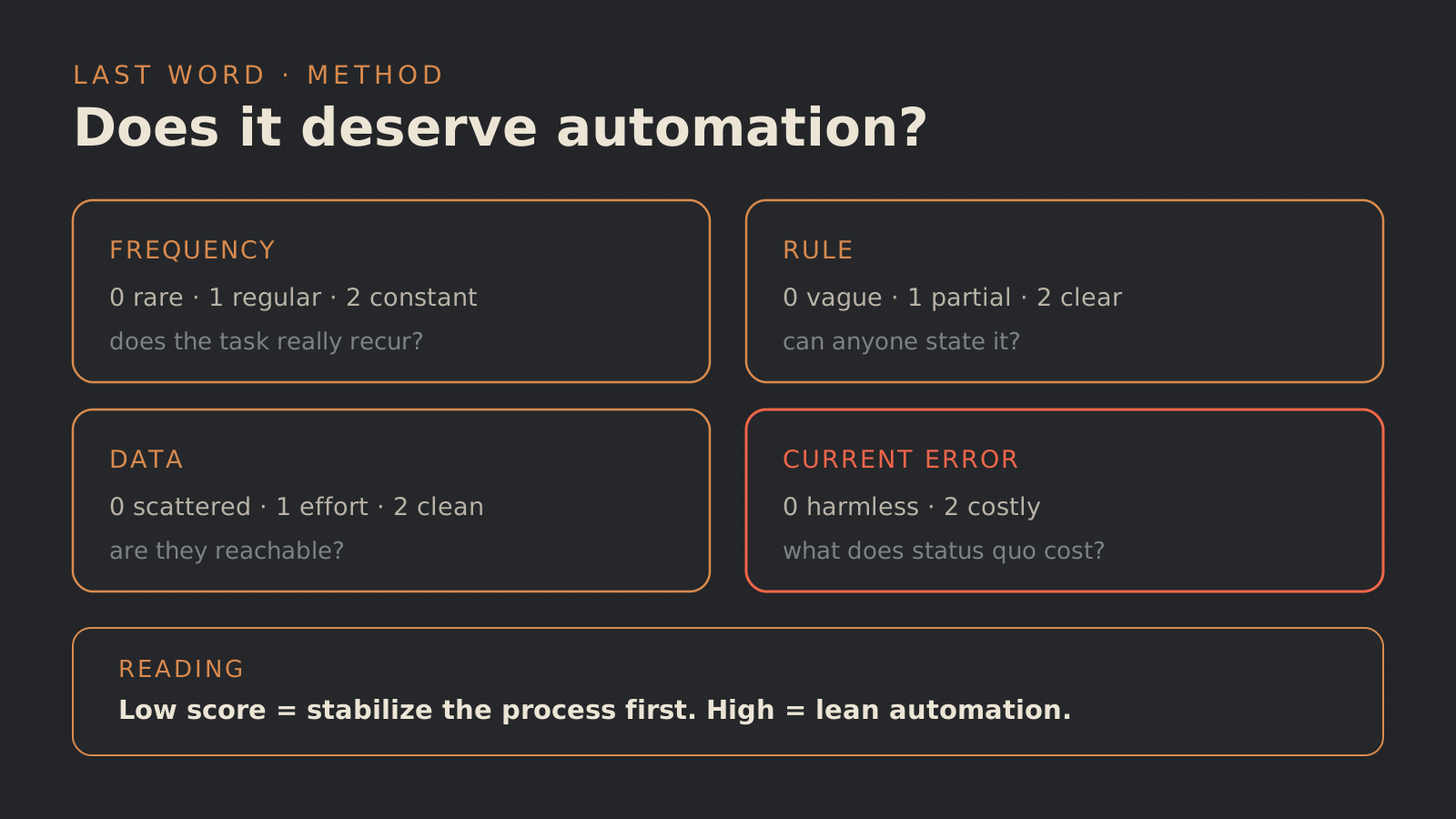
A useful automation score
Give each criterion a score from 0 to 2.
Frequency
0: Rare 1: Regular 2: Very frequent
Rule
0: Unclear 1: Partial 2: Clear
Data
0: Scattered 1: Accessible with effort 2: Clean and available
Current error
0: Minor 1: Irritating 2: Costly
Automation risk
0: High 1: Medium 2: Low
Visibility gain
0: None 1: Some 2: Useful logs
Interpret the total with caution:
- 0 to 5: document before automating;
- 6 to 8: good candidate for a prototype;
- 9 to 12: priority candidate, if there is a business owner.
This score is not a truth machine. Its value is that it forces a conversation about risk and maintenance, not only time savings.
Workflows that are often worth it
The best first workflows reduce copy-paste, forgotten follow-ups and delays.
Reasonable examples include:
- automatically creating a project folder after signature;
- sending a reminder when a step remains blocked;
- classifying an inbound request into a few categories;
- syncing a form with a CRM;
- generating an internal task after a customer email;
- producing a daily summary of important events;
- monitoring a web page and reporting a useful change.
These automations do not need to pretend to be AI. Some may use a model to read free text, but the value usually comes from the complete workflow.
Workflows to avoid at the beginning
Be careful with processes where every case requires an exception. If the team answers “it depends” to every question, start by documenting the decisions.
Also be careful with irreversible actions: deletion, payment, contractual modification, mass sending to customers. These actions can enter a system later, but with validation, logs and thresholds.
Finally, avoid invisible automations. If nobody knows a workflow is running, nobody will be able to diagnose the error. A good workflow leaves a readable trace.
Implementation path
1. Observation
Goal: See the real process Deliverable: List of actions and exceptions
2. Simplification
Goal: Remove unnecessary steps Deliverable: Target process
3. Prototype
Goal: Test on a small scope Deliverable: Limited workflow
4. Logging
Goal: Understand success and failure Deliverable: Logs and statuses
5. Validation
Goal: Keep humans in the right place Deliverable: Control points
6. Maintenance
Goal: Avoid the forgotten workflow Deliverable: Owner and procedure
Simplifying before automating is often the most profitable step. If two approvals exist only out of habit, do not automate both. Remove one if the business allows it.
Checklist before building
- The trigger is clear.
- The input data is available.
- The expected output is defined.
- Common exceptions are known.
- The business owner is identified.
- The workflow can be stopped without breaking the company.
- Errors will be visible.
- Required access is limited.
- Human validation exists for sensitive actions.
- The first test can run on a small volume.
If three items are missing, the project is not ready. That is not a failure. It is honest scoping.
Where AI can help
AI becomes useful when the input varies: long email, imperfect PDF, poorly phrased customer request, web page with changing structure. It can classify, extract, summarise or propose an action.
But the surrounding workflow remains essential: source control, validation, logging and recovery when something fails. AI reads and proposes. The system decides what is allowed.
Three refusals that save time
- Reject fuzziness: if nobody can describe the rule, map before connecting.
- Reject fake volume: if the case appears twice a month, start elsewhere.
- Reject the miracle tool: if the issue is the business decision, tooling will not fix it.
- Reject irreversible action: if it cannot be undone, human control stays in front.
FAQ
Should we start with n8n, Make, Zapier or custom code?
Choose after scoping. For a prototype, a visual tool can be enough. For a critical or highly specific process, custom code may be cleaner.
Should automation replace a person?
No. The best first gains remove administrative tasks, not judgement. The team keeps the important decisions and recovers time from repetitive operations.
How do we prevent a workflow from breaking silently?
Add statuses, failure alerts, a log and an owner. Automation without observability quickly becomes invisible debt.
The right target
Automate a process frequent enough to matter, clear enough to test and limited enough to correct quickly. To avoid false starts, connect the scoping work to a method for building an AI agent and to AI workflows with human review. If you want to choose the right first workflow, Last Word can audit two or three processes and propose a short trajectory. The entry point is here: contact.